
luges (Linux User Group Esslingen)

May 02, 2012

luges Gathering

luges Stammtisch - 2012-05-02

This month's come together will be held on 2012-05-02, 8pm at our regular pub (Trödler).

May 02, 2012 12:00 AM

April 04, 2012

luges Gathering

luges Stammtisch - 2012-04-04

This month's come together will be held on 2012-04-04, 8pm at our regular pub (Trödler).

April 04, 2012 12:00 AM

March 19, 2012

Adrian Reber

Mirror

End of 2008 I received following email:

Hello

My name is James and i will like to know whether you do sell Mirror .If you do sell them,reply me back with the brands and the prices of the ones that you do have so that i can let you know the brand and the quantity am interest in purchasing.Thanks and await to hear back from you .

Warm Regards

James

I am not sure if this was really meant seriously or just a joke.

by adrian at March 19, 2012 08:19 PM

March 07, 2012

luges Gathering

luges Stammtisch - 2012-03-07

This month's come together will be held on 2012-03-07, 8pm at our regular pub (Trödler).

March 07, 2012 12:00 AM

February 01, 2012

luges Gathering

luges Stammtisch - 2012-02-01

This month's come together will be held on 2012-02-01, 8pm at our regular pub (Trödler).

February 01, 2012 12:00 AM

January 11, 2012

luges Gathering

luges Stammtisch - 2012-01-11 [verlegt]

This month's come together will be held on 2012-01-11, 8pm at our regular pub (Trödler).

January 11, 2012 12:00 AM

December 07, 2011

luges Gathering

luges Stammtisch - 2011-12-07

This month's come together will be held on 2011-12-07, 8pm at our regular pub (Trödler).

December 07, 2011 12:00 AM

November 02, 2011

luges Gathering

luges Stammtisch - 2011-11-02

This month's come together will be held on 2011-11-02, 8pm at our regular pub (Trödler).

November 02, 2011 12:00 AM

October 05, 2011

luges Gathering

luges Stammtisch - 2011-10-05

This month's come together will be held on 2011-10-05, 8pm at our regular pub (Trödler).

October 05, 2011 12:00 AM

September 14, 2011

luges Gathering

luges Stammtisch - 2011-09-14 [verlegt]

This month's come together will be held on 2011-09-14, 8pm at our regular pub (Trödler).

September 14, 2011 12:00 AM

August 03, 2011

luges Gathering

luges Stammtisch - 2011-08-03

This month's come together will be held on 2011-08-03, 8pm at our regular pub (Trödler).

August 03, 2011 12:00 AM

July 06, 2011

luges Gathering

luges Stammtisch - 2011-07-06

This month's come together will be held on 2011-07-06, 8pm at our regular pub (Trödler).

July 06, 2011 12:00 AM

June 25, 2011

The Administration

Over 10TB on one day. All thanks to Firefox: 10.14TB

June 25, 2011 01:00 AM

June 23, 2011

The Administration

Again a traffic record. Almost 10TB on one day.

June 23, 2011 01:00 AM

June 08, 2011

luges Gathering

luges Stammtisch - 2011-06-08 [verlegt]

This month's come together will be held on 2011-06-08, 8pm at our regular pub (Trödler).

June 08, 2011 12:00 AM

May 04, 2011

luges Gathering

luges Stammtisch - 2011-05-04

This month's come together will be held on 2011-05-04, 8pm at our regular pub (Trödler).

May 04, 2011 12:00 AM

April 30, 2011

The Administration

Yesterday we established a new traffic record. 8.13TB. Thanks to the combined release of Ubuntu 11.04 and Firefox.

April 30, 2011 01:00 AM

April 06, 2011

luges Gathering

luges Stammtisch - 2011-04-06

This month's come together will be held on 2011-04-06, 8pm at our regular pub (Trödler).

April 06, 2011 12:00 AM

April 01, 2011

The Administration

All of a sudden it is a cluster! For over ten years a single machine was serving all the files we are mirroring. Today we started to use a second machine to distribute the load hoping to improve the user experience.

April 01, 2011 01:00 AM

March 02, 2011

luges Gathering

luges Stammtisch - 2011-03-02

This month's come together will be held on 2011-03-02, 8pm at our regular pub (Trödler).

March 02, 2011 12:00 AM

February 17, 2011

The Administration

Added new mirror: Mageia.

February 17, 2011 12:00 AM

February 08, 2011

Alexander König

New scratching device

Today I finally managed to release a new version of terminatorX, which had been broken for quite a while as some changes in either gtk+ or X.org broke the mouse grabbing code. Anyway, just recently I bought a new mouse as the left button of its predecessor was worn out. I decided to go for a high precision device, so I ended up with a Razer laser mouse (Lachesis).

At first I was stunned that the manufacturer actually labels the device as a “weapon of mass destruction”, but hey I use with a piece of software called “terminatorX” – so who am I to judge. Once you get used to the high resolution, the mouse really is a very precise input device – and it does help operating terminatorX quite a bit. The guys from Phoronix gave the mouse (or an earlier version of it) a test and liked it, too, however they were disappointed that Razer does not provide official Linux support. While this still holds true today, I have to say that my experience with the device under Linux has been excellent so far: you plug it in, it works perfectly an you can switch the resolution with the two buttons on top.

Some might be disappointed that there is no fancy user interface allowing you to tune and configure the device – I appreciate the fact that I don’t have to configure anything.

by alex at February 08, 2011 11:23 PM

February 02, 2011

luges Gathering

luges Stammtisch - 2011-02-02

This month's come together will be held on 2011-02-02, 8pm at our regular pub (Trödler).

February 02, 2011 12:00 AM

January 12, 2011

luges Gathering

luges Stammtisch - 2011-01-12 [verlegt]

This month's come together will be held on 2011-01-12, 8pm at our regular pub (Trödler).

January 12, 2011 12:00 AM

December 01, 2010

luges Gathering

luges Stammtisch - 2010-12-01

This month's come together will be held on 2010-12-01, 8pm at our regular pub (Trödler).

December 01, 2010 12:00 AM

November 06, 2010

Michael Hauser

After the deadline

I’ve found a nice plugin for WP:
After the Deadline.
It might help to improve the text quality. At least mine.

by Michael at November 06, 2010 06:38 PM

RTC battery gone bad

Long ago I’ve spent a day in Frankfurt. Since I’ve never been there I went for the first parking I saw. And I got the following ticket with an interesting date.

ticket

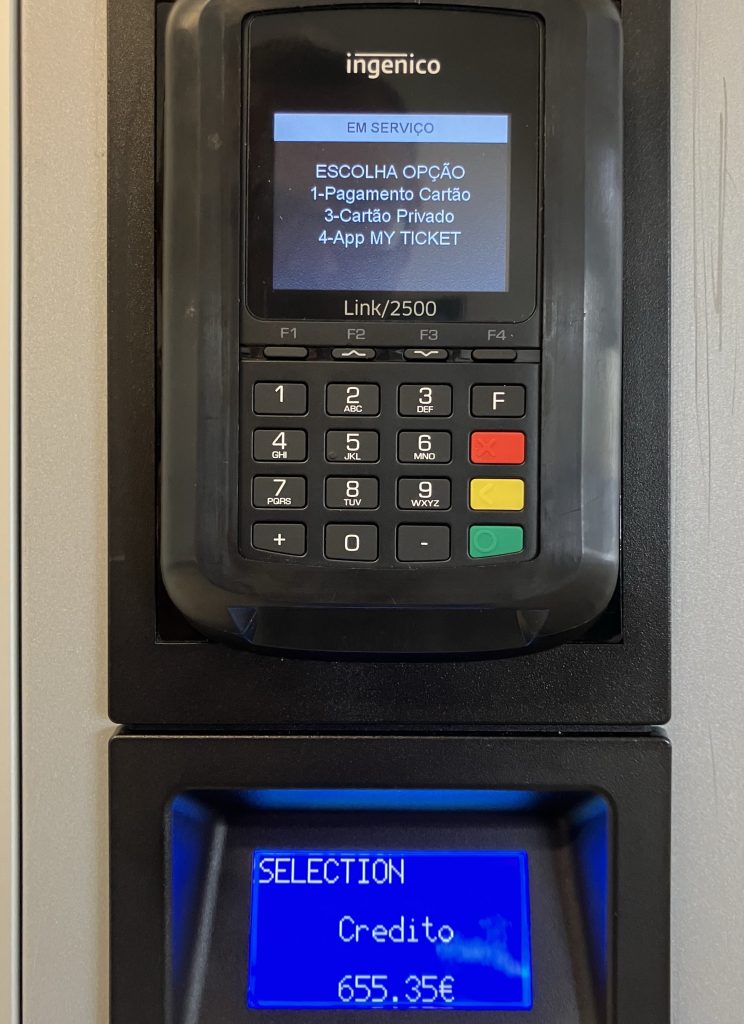
In the evening I got an amount displayed on the machine that slightly exceeds the credit level of my credit card. (Sorry for the bad quality, but taking pictures of LCDs in direct sunlight is a challenge)

display

After waiting for a long time and talking to the service people the amount was reduced.

by Michael at November 06, 2010 06:25 PM

Alexander König

RAID away

During the last week I’ve replaced the disks of my software RAID with larger ones as the capacity was exceeded. While this is theoretically an easy task, I had to learn a few things along the way:

  • Trying to perform such an upgrade on a headless system without console will fail.
  • fdisk silently fails to parse integer values larger than 2147483647.
  • The md superblock is located at the end of the partition/disk that you add to the RAID.
  • If the kernel associates the complete drive to a specific md device instead of the last partition, blocking the use of other partitions for other md devices, resize the last partition to leave some (wasted) space at the end to ensure that the end of the last RAID partition differs from the end of the drive.
  • Some manufactures build ‘green’ disks that constantly unload/load their heads, causing the drive to run out of spec in a very short time. If the manufacturer provides a DOS tool to correct that behavior, a pretty easy solution is to put it onto a bootable CD.
  • This stride calculation script helps to optimize the performance of the filesystem running on a RAID5.
  • Cheap desktop drives might be a bad choice for a RAID, if they break during the first re-sync of the RAID you can try to recover your data by re-creating the RAID – Thanks, Adrian!

by alex at November 06, 2010 10:47 AM

November 03, 2010

luges Gathering

luges Stammtisch - 2010-11-03

This month's come together will be held on 2010-11-03, 8pm at our regular pub (Trödler).

November 03, 2010 12:00 AM

October 06, 2010

luges Gathering

luges Stammtisch - 2010-10-06

This month's come together will be held on 2010-10-06, 8pm at our regular pub (Trödler).

October 06, 2010 12:00 AM

September 28, 2010

The Administration

September 15, 2010

The Administration

September 01, 2010

luges Gathering

luges Stammtisch - 2010-09-01

This month's come together will be held on 2010-09-01, 8pm at our regular pub (Trödler).

September 01, 2010 12:00 AM

August 11, 2010

luges Gathering

luges Stammtisch - 2010-08-11 [verlegt]

This month's come together will be held on 2010-08-11, 8pm at our regular pub (Trödler).

August 11, 2010 12:00 AM

July 19, 2010

Adrian Reber

A New Order

A few weeks ago I upgraded the hard disk in my notebook from 160GB to 250GB. I copied the whole hard disk using dd from the old drive to the new drive. I still had to change the partition layout to use the new space. So I downloaded the gparted live CD, booted it and discovered that I was not able to move an extended partition using gparted. I have the following partitions:

/dev/sda1          7  HPFS/NTFS
/dev/sda2          7  HPFS/NTFS
/dev/sda3   *     83  Linux
/dev/sda4          5  Extended
/dev/sda5         83  Linux

My plan was to increase the Windows partitions as well as the Linux partitions. To increase the size of /dev/sda2 I had to move /dev/sda3 and /dev/sda4. I was not able, however, using gparted, to move /dev/sda4. So I decided that I had to make a backup of /dev/sda5, then delete it (and /dev/sda4), move /dev/sda3 and increase the size of /dev/sda2.

Therefore I booted a Fedora installation DVD in the rescue mode and made a backup of /dev/sda5:

dd if=/dev/sda5 bs=65536 | ssh adrian@backup-server "dd of=sda5.img bs=65536"

Then I booted the gparted live CD and deleted /dev/sda5 and /dev/sda4, moved /dev/sda3 and increased the size of /dev/sda2. After that I created a new extended partition (/dev/sda4) and created /dev/sda5 using the remaining space. After gparted finished I booted the Fedora installation DVD again in the rescue mode and restored the backup:

ssh adrian@backup-server "dd if=sda5.img bs=65536" | dd of=/dev/sda5 bs=65536

At the end of the operation I booted my system and was happy that it still worked. Now I still had to resize the encrypted partition. This was pretty easy:

cryptsetup resize luks-<uuid>
pvresize /dev/mapper/luks-<uuid>

Before doing the lvresize I checked the available extends with vgdisplay and used that number in the following lvresize command:

lvresize -l +16449 /dev/mapper/vg_dcbz-lv_root
resize2fs /dev/mapper/vg_dcbz-lv_root

And that was already it. It took some time (maybe 4 hours), but everything finished without any problems. To make sure everything finished without any problems I forced a fsck (touch /forcefsck; reboot).

Before:

Filesystem            Size  Used Avail Use% Mounted on
/dev/mapper/vg_dcbz-lv_root
                       74G   69G  1.4G  99% /

After:

Filesystem            Size  Used Avail Use% Mounted on
/dev/mapper/vg_dcbz-lv_root
                      137G   69G   62G  53% /

by adrian at July 19, 2010 09:09 AM

July 14, 2010

luges Gathering

luges Stammtisch - 2010-07-14 [verlegt]

This month's come together will be held on 2010-07-14, 8pm at our regular pub (Trödler).

July 14, 2010 12:00 AM

July 12, 2010

Patrick Cervicek

Deploy own Root CA Certificates in Firefox

Companies sometimes do not want to sign their intranet-webserver X509 certificates through a Certificate Authority like VeriSign or Thawte to save costs.
Firefox comes with some CAs included, but it looks like there is no easy way to distribute your own CA to your users.

Today I made some tests with certutil and got a promising solution by distributing an own cert8.db file in /etc/firefox

cd /tmp
# retrieve all CA you wish to make available to your users
wget http://pki.example.com/Root-CA-base64.crt
wget http://pki.example.com/…-base64.crt
….

# install certutil
apt-get install libnss3-tools
# Create new certificate and key databases.
# only cert8.db is important for your users
mkdir tmp
certutil -N -d tmp/
# Insert CAs into cert8.db
for i in *crt ; do certutil -A -n “$i” -t “CT,c,c” -d tmp/ -i “$i” ; done
chmod a+r tmp/cert8.db
cp tmp/cert8.db /etc/firefox-3.5/profile/cert8.db

Unfortunately this solution only works for users not having already a firefox profile in their home. A workaround could be to iterate over all user homes and modify directly the profile folders with certutil.
If you know better ways to distribute a custom root CA certificate, please let me know!

by admin at July 12, 2010 04:06 PM

July 11, 2010

Adrian Reber

Archaeology

If I remember it correctly my server at home (file-server, print-server, router, …) has been installed a long time ago using Red Hat Linux 8.0. Since the initial installation I have done live upgrades using rpm, apt-get or yum to its current version (Fedora 11). Now I just started doing a live upgrade using yum to Fedora 13 and I got an interesting dependency problem:

--> Finished Dependency Resolution
lilo-21.4.4-26.i386 from installed has depsolving problems
 --> Missing Dependency: mkinitrd >= 3.4.7 is needed by package lilo-21.4.4-26.i386 (installed)

It seems I still have an unused version of lilo installed on my system and now that mkinitrd has been replaced yum starts complaining. The lilo package is from 2004 and has also been installed in 2004 (according to the RPM database). It is the oldest package on my system but now it has to go.

by adrian at July 11, 2010 10:54 AM

June 25, 2010

Michael Hauser

New Toy

Since my boss told me to reduce my overtime I’ve ordered a new toy to compensate the lack of work.
Alix unpacked
Currently I’m installing the system based on this description. Main idea is to get rid of the loud, big and of course power consuming solution I currently use as internet gateway and print server.

by Michael at June 25, 2010 01:50 PM

June 14, 2010

Patrick Cervicek

S60 – new line in Stuttgart

Today the new S60 line started and I tested it. It is as fast as with the bus, but I am now not longer dependent on the bus (the last bus to my work drives 8:45am)

by admin at June 14, 2010 06:04 PM

June 02, 2010

luges Gathering

luges Stammtisch - 2010-06-02

This month's come together will be held on 2010-06-02, 8pm at our regular pub (Trödler).

June 02, 2010 12:00 AM

May 22, 2010

Alexander König

Floppies Revisted

Last weekend I upgraded most of my home systems to run Lucid Lynx. From the software point of view everything went pretty smoothly and I am really happy so far. I like the new look which is not surprising as I’ve been using the Dust theme prior to 10.04 and they are not very far apart. The new Ubuntu One integration is an interesting way of trying to make Ubuntu sustainable, I do hope however that it will stay out of my way if I don’t want to use it.

I was close to downloading an album through Ubuntu One until they requested me to register my computer. This is something I do not want to do just to buy an album, so I stopped right there and resorted to the wonderful clamz.

Anyway, during the setup I had to realize that CD-Rs have become the floppies of 2010 – not only capacity-wise but also regarding the reliability. I’ve been having this problem with Ubuntu as well as Fedora setups: When you burn the CD-R just before running the setup on another machine with a different optical drive you will often get read errors at some point in time – typically after being halfway through the setup process. This brings me to my request to the authors of Linux distribution setup procedures: If you cannot read a package from the CD please try downloading it from the Internet after asking the user whether it is OK to do so. I fixed one of the setups with a manual chroot onto the new root fs after modifying the sources.list, on another machine I simply used the mini iso which downloads eveything via the network.

by alex at May 22, 2010 01:29 PM

May 12, 2010

Patrick Cervicek

Window Buttons (Minimize, Maximize, Close) issue in Ubuntu 10.04 LTS

Many users complained about the arrangement of the windows button (minimize,maximze,close) in Ubuntu 10.04 LTS. To get the old behavior back a user would have to use
gconftool-2 --set /apps/metacity/general/button_layout --type string "menu:minimize,maximize,close"

As I have to roll out Ubuntu 10.04 on several desktops I wanted to fix this “bug” globally on the whole system without modifying any user profiles. These two lines do the trick:

echo '/apps/metacity/general/button_layout "menu:minimize,maximize,close"' > /usr/share/gconf/defaults/99_fix-menu
/usr/bin/update-gconf-defaults

by admin at May 12, 2010 08:01 PM

May 05, 2010

luges Gathering

luges Stammtisch - 2010-05-05

This month's come together will be held on 2010-05-05, 8pm at our regular pub (Trödler).

May 05, 2010 12:00 AM

April 19, 2010

Patrick Cervicek

How do I get the last field of a line with cut?

Just reverse the order and return the first field!

echo a/b/c | rev | cut -d/ -f1 # results in "c"

You could also use awk -F/ '{ print $NF}'

by admin at April 19, 2010 10:16 PM

April 07, 2010

luges Gathering

luges Stammtisch - 2010-04-07

This month's come together will be held on 2010-04-07, 8pm at our regular pub (Trödler).

April 07, 2010 12:00 AM

April 05, 2010

Michael Hauser

Kellerdieb

Sorry for the German title, but the translated one I did not like. Someone has stolen my partition in the basement. Not just some things from it. My complete partition is taken over by someone else. When I recently went down to put my suitcase I could not find my partition any more. The place did not look like before any more. After some searching it turned out that someone has broken my lock, filled my partition with his things, put paper on the inside of the metal grid (that’s why it looked completely different) and put a new lock. So now I have a partition with someone else’s things any my flat full of things.

by Michael at April 05, 2010 04:21 PM

April 02, 2010

Adrian Reber

Cluster Installation Finished

The hardware of our cluster is finally installed and ready. All 180 compute nodes (almost) are ready, Infiniband is working and the lustre is mounted.

First Infiniband benchmarks gave us results of about 23 GBit/s which is the expected bandwidth with our QDR network.

As a mirror admin I am bit frustrated that i cannot use the big filesystem which is mounted on every compute node for my mirror server:

172.31.100.222@o2ib,172.30.100.222@tcp:172.31.100.221@o2ib,172.30.100.221@tcp:/lprod
                       29T  819M   28T   1% /lustre/ws1

Now I still need to install the frontend servers. One is used for the users to log in and submit jobs and the other will contain the grid software as this cluster wil be part of the bwGRiD.

by adrian at April 02, 2010 08:57 AM

March 18, 2010

Patrick Cervicek

Suspend to disk with Ubuntu 9.10

I had problems using suspend to disk. It worked after adding GRUB_CMDLINE_LINUX="resume=/dev/sda6" #the name of my swap partition to /etc/default/grub and running update-grub2

by admin at March 18, 2010 09:52 AM

March 14, 2010

Adrian Reber

28th Open Grid Forum

Starting tomorrow (2010-03-15), I will be at the 28th Open Grid Forum (OGF28) in Munich for four days.

by adrian at March 14, 2010 06:29 PM

March 03, 2010

luges Gathering

luges Stammtisch - 2010-03-03

This month's come together will be held on 2010-03-03, 8pm at our regular pub (Trödler).

March 03, 2010 12:00 AM

February 26, 2010

The Administration

This server will not be reachable tomorrow (Saturday 2010-02-27) due to campus wide network changes for at least 8 hours.

February 26, 2010 12:00 AM

February 23, 2010

Adrian Reber

80 Nodes Up And Running

80 compute nodes from our cluster are up and running. We are now waiting for more switches and the filesystem servers to finally get the complete cluster (with all compute nodes) operational. To get the remaining nodes operational all I have to do is to add their MAC address to a file and with the magic of some scripts everything else is configured automatically. Unfortunately it all depends on the missing ethernet switches which should arrive any day now.

by adrian at February 23, 2010 01:14 PM

February 22, 2010

Patrick Cervicek

802.1x & EAP-TLS: Alert (Level: Fatal, Description: Unexpected Message)

Today we achieved to connect to our corporate WLAN (802.1x / EAP-TLS). Normally certificates are only issued to our Windows Users but with help of our IT Department we got certificates for our linux machines. My colleagues tried it several times but it didn’t work with networkmanager neither with wpasupplicant. The last days I had the “chance” to try myself. I started wpasupplicant together with wireshark. After sending Client Hello to our accesspoint (connected to a radius server) , it returned an error message:

Alert (Level: Fatal, Description: Unexpected Message)

The fatal alert Unexpected Message “should never be observed in communication between proper implementations”. The server did not want to see my my certificates and stopped talking to me immediately. After comparing Client Hello bit-by-bit with RFC 2246, I hit on the SessionTicket TLS Extension (defined in RFC 4507) sent by my client:

Ethernet II
802.1X Authentication
Extensible Authentication Protocol
Secure Socket Layer
SSL Record Layer: Handshake Protocol: Client Hello
Handshake Protocol: Client Hello
….
Compression Methods Length: 2
Compression Methods (2 methods)
Extensions Length: 4
Extension: SessionTicket TLS
Type: SessionTicket TLS (0×0023)
Length: 0
Data (0 bytes)

I was asking myself what would happen if I would remove this Extension from the Client Hello so it would look like a old-fashioned RFC2246 datagram? To accomplish this I downloaded the openssl sourcecode with apt-get source openssl, removed enable-tlsext from rules/debian and rebuilt the code with make -f debian/rules (I didn’t want to install it).
I started wpasupplicant with

LD_LIBRARY_PATH=~/openssl-0.9.8g/ wpa_supplicant -d -i wlan0 -Dwext -c WLAN.conf

and it worked! The TLS Extension is not sent by my client and in wireshark the response from the accesspoint looks now like a well formed Server Hello

TLSv1
Certificate, Client Key Exchange, Certificate Verify, Change Cipher Spec, Encrypted Handshake Mess

Conclusion: I am now sure that the server handles the Client Hello wrong. RFC2246 describes in its “Forward compatibility” note:

In the interests of forward compatibility, it is permitted for a client hello message to include extra data after the compression methods. This data must be included in the handshake hashes, but must otherwise be ignored.

by admin at February 22, 2010 11:33 PM

February 15, 2010

Patrick Cervicek

Installing [K|U]buntu with one line?

Just use aptitude --with-recommends install [k]ubuntu-desktop !

by admin at February 15, 2010 03:41 PM

February 11, 2010

Adrian Reber

RAID 1 Shrinking

I was not happy with the partitioning of one of the cluster infrastructure servers. It had a software RAID for /boot, one for swap and the rest was a big software RAID for /. I should have used LVM for / for easy resizing, but I forgot and so I had to do it the hard way. I wanted to resize /dev/md2 which was used for / and then use LVM for the rest.

First I had to resize the filesystem. Online shrinking is not supported for resize2fs (at least I was not able to do it) and so I had to boot the CentOS 5.4 rescue system.

After dropping to the shell of the rescue system (without mounting the filesystems) I copied a mdadm.conf from a similar system to /etc so that I would be able to start the RAIDs:

  • mdadm -A /dev/md0
  • mdadm -A /dev/md1
  • mdadm -A /dev/md2

Only starting /dev/md2 would have be enough, but I wanted to make sure that everything is working as it is supposed to. Then, before running resize2fs, I had to do a filesystem check:

  • e2fsck -f /dev/md2 -C 0

Next step was to actually shrink the filesystem and make it smaller than the desired final size:

  • resize2fs /dev/md2 30G

Then I shrunk the RAID to about 40GB:

  • mdadm --grow /dev/md2 -z 40000000

and after that I had to resize the filesystem again to use the 40GB:

  • resize2fs /dev/md2

At this point I mounted the filesystem to see if it actually worked and it looked good (and smaller). Now came the hard part; to use the remaining space I had to re-partition the disk. I started fdisk and deleted the corresponding partitions and created at the same start point smaller partitions (42GB). This was the part were I was really worried about losing all my data which was fortunately backed up (of course). After I created the smaller partitions I tried to start /dev/md2 and it failed, saying that it could not find any RAID partitions.
I then tried to create the RAID again, hoping all data would be still available. I first created the RAID with only one device:

  • mdadm --create /dev/md2 -n 2 -l 1 /dev/sdb3 missing

This seemed to work and after mounting the new RAID I saw that all my files were still there. So the next step was to add the second device to the RAID with:

  • mdadm --manage -a /dev/md2 /dev/sda3

At this point the RAID started to re-sync and 20 minutes later I was able to grow the RAID to the new partition size:

  • mdadm --grow /dev/md2 -z max

Again I had to wait and before doing the final filesystem resize another filesystem check was necessary:

  • e2fsck -f /dev/md2 -C 0
  • resize2fs /dev/md2

And after only two hours I finally had what I wanted. I rebooted the system and it came up with the smaller / partition. I used the remaining space to create a new RAID (/dev/md3) which will probably be used with LVM if I ever need more space on this server in the future.

Without having a backup I would have not done all the steps because I was not always sure it would actually work.

by adrian at February 11, 2010 04:29 PM

February 10, 2010

Alexander König

Flashing Maemo

Yesterday, I finally found the time to flash my N900 with the latest Maemo version PR1.1. I ran the flasher software on a Fedora host and the process performed quickly without problems. After recovering my backup everything was back  to normal. Unfortunately I had no wifi available at the time, so when the backup recovery re-established the software setup, it downloaded ~50MB via UMTS which was somewhat unexpected.

Most notably, the browser feels even snappier than before and I am very pleased that connecting to my OpenVPN now also works over the UMTS/GPRS connection – with the previous version I could join the VPN via WLAN only (and even Patrick couldn’t fix it). I also noted quite a few new packages in the repositories, so there are more hours of fun ahead…

by alex at February 10, 2010 08:35 AM

February 07, 2010

Adrian Reber

Just Like Three Weeks Ago

Yesterday (2010-02-06) Benjamin and myself were again in Lech/Zürs snowboarding; just like three weeks ago. Last time (2010-01-17) Pattrick and Torsten were also able to join. This time it was only Benjamin and me.

The weather was similar to our last visit. Mostly cloudy with a few peeks of sunshine. This time, however, we had lots of new deep powder and it was freeriding time. Extremely exhausting but great fun.

by adrian at February 07, 2010 04:08 PM

Patrick Cervicek

Mass unattended Linux installation with FAI

Me and my colleague are responsible for linux installations at our customer. In our scenario installations are complicated:

  • We are not allowed to operate an own DHCP server. The corporate DHCP server does not allow us to modify the TFTP/NFS Server settings
  • Our users/clients are not at our site which makes installations difficult: We have to go to our users or our users have to bring-in their client. The distance to our customers is high
  • Users with different hardware (RAM, HD,…) and different configuration (local users,…)

Finally we found a solution which allows us to do installations with FAI. FAI is a tool for mass unattended Linux installation. FAI works well when your hardware and configuration is the same. As we have different clients we had to implement a hook for interactive configuration.
The picture shows our final installation procedure:

We prepared an ISO file to allow our customers to remote boot an rescue system with SSH enabled. This ISO file does not have to be touched anymore as all configuration is stored on our servers. The user would only have to write this ISO (a dd-dump) to an USB stick, connect it with the client to be installed and power it on. The rescue system gets an IP with DHCP and uses a NFS export of our server as nfsroot. The kernel parameter nfsroot= make sure it uses our NFS server. After booting the rescue system, the User gets a message with the actual IP and our telephone number. The user has to call us to start the installation procedure.

We can then connect with ssh and the client IP. As the nfsroot contains our public SSH keys we do not need any passwords. Our corporate DNS allows the use of dynamic DNS. It would also be possible to use a hostname to connect. Unfortunatelly the actual “ipconfig” in the ramdisk has not all DHCP features included and does not send its own hostname in the DHCPREQUEST. There exists already a patch, but it is still not merged.
Before this “rescue linux with nfsroot=” solution we tried gPXE and a patch of me. It did do the DNS update, but gPXE has problems booting some NICs so we abandoned it.

After log-in with ssh we start with preconfiguration of some individual items which would not make sense to configure them in our FAI repository: userid of the owner, install target (sda/sdb/….), encryption yes/no, size of the swappartition,…
The config is written to /tmp/fai/myvars.sh. Hooks and scripts can later access this config to prevent user interaction during installation.
We trigger then the start of the installation procedure (FAI) and watch the installation progress with

tail -f /tmp/fai/fai.log

FAI uses tarballs as base image and installs further packages on it. To speed up the installation we have images with preinstalled KDE/GNOME.

Now we have a standard way to install our clients. FAI also allows to install other distributions like Ubuntu, but it is still not the same : Installations with DVD are different with FAI.
FAI requires a list of packages to be installed. It would be helpful if Ubuntu would provide a meta-package which would also install the same packages as the Ubuntu installer does. FAI could then do the same procedure without using a tarball.

by admin at February 07, 2010 12:11 PM

February 04, 2010

The Administration